Showing posts with label Overdrive. Show all posts
Showing posts with label Overdrive. Show all posts
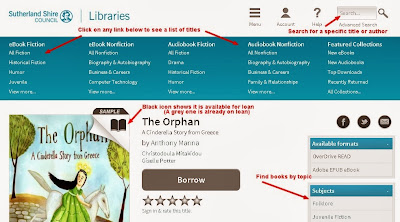
Overdrive audiobooks and ebooks: new features
In a recent update to our Overdrive audiobooks and ebooks service 2 new features were added that users of this service will want to know about.
On Holiday? Relax with a good eBook
Your library has titles you can download or read online, wherever you are, this holiday season!
eBooks and eAudio are indicated in your library catalogue search results by these two icons:
The icons with the 'e' as part of the caption indicate the titles which are Electronic Resources, and as such, they can be used from anywhere you have an internet connection! No need to physically visit the library to use them.
The library holds two types of eBook and two types of eAudio book.
eBooks in the Gale Virtual Reference Library and CSIRO Publishing titles can be used directly from your search result list, each record has a link to it's online location.


Or search the catalogue for either of these collections and follow the link to the entire title list and search within them.

These eBooks can look like this

OR this.

All titles GVRL and CSIRO titles are available to anyone at anytime. There are no loan periods or waitlists.

eBooks from Overdrive do not open directly from the search results. First time users must look at the instructions supplied from the library's Overdrive Audiobooks and eBooks Learn More link, to ensure setup is smooth.

Overdrive has a great range of Fiction and Non-fiction titles, which can be found via Encore or in Overdrive itself.

Overdrive allows you to borrow titles for a 3 week period, (shorter if you wish), renew them and place a hold on them, if they are out on loan. One can have a maximum of 10 titles out at a time, whether that is a mix of eBook or eAudio.
TIP: Overdrive titles do not appear on your regular library online account, a separate Overdrive account is created for each member and loans, returns and holds etc. are managed from there.
eAudio is also available from Overdrive, with the titles coming from over 2,000 publishers, (including HarperCollins, Random House & MacMillan) and new ones being added all the time, there is something for everyone.

eAudio is the only format available from OneClickDigital, so if you want something...anything... to listen to whilst on those long holiday drives, (or on your morning runs) browse through the range offered by OneClickDigital. First time around one needs to create a new account, which enables the creation of preferences, alerts and collection lists. A preview is provided so the reader's voice can be assessed before downloading!

Overdrive and OneClickDigital do require software to be downloaded to your PC or portable device on the first use. All the information required to access these convenient titles is contained on the library website under the menu option Online Resources.
You may recognise it by either of these screenshots;
Encore Home Page
Encore search box on the Library Home Page

If your search does not immediately show eBooks or eAudio books then use the tools above to limit your results to the material type you require.

Please ask staff, if you have any questions about these great resources
eBooks and eAudio are indicated in your library catalogue search results by these two icons:
 |
| eBook 2013 |
 |
| eAudio 2013 |
The library holds two types of eBook and two types of eAudio book.
eBooks in the Gale Virtual Reference Library and CSIRO Publishing titles can be used directly from your search result list, each record has a link to it's online location.


Or search the catalogue for either of these collections and follow the link to the entire title list and search within them.

These eBooks can look like this

OR this.

All titles GVRL and CSIRO titles are available to anyone at anytime. There are no loan periods or waitlists.

eBooks from Overdrive do not open directly from the search results. First time users must look at the instructions supplied from the library's Overdrive Audiobooks and eBooks Learn More link, to ensure setup is smooth.

Overdrive has a great range of Fiction and Non-fiction titles, which can be found via Encore or in Overdrive itself.

Overdrive allows you to borrow titles for a 3 week period, (shorter if you wish), renew them and place a hold on them, if they are out on loan. One can have a maximum of 10 titles out at a time, whether that is a mix of eBook or eAudio.
TIP: Overdrive titles do not appear on your regular library online account, a separate Overdrive account is created for each member and loans, returns and holds etc. are managed from there.

eAudio is also available from Overdrive, with the titles coming from over 2,000 publishers, (including HarperCollins, Random House & MacMillan) and new ones being added all the time, there is something for everyone.
eAudio is the only format available from OneClickDigital, so if you want something...anything... to listen to whilst on those long holiday drives, (or on your morning runs) browse through the range offered by OneClickDigital. First time around one needs to create a new account, which enables the creation of preferences, alerts and collection lists. A preview is provided so the reader's voice can be assessed before downloading!

Overdrive and OneClickDigital do require software to be downloaded to your PC or portable device on the first use. All the information required to access these convenient titles is contained on the library website under the menu option Online Resources.
Find eBooks or eAudio regardless of who supplies them!
eBooks and eAudio titles cover a wide range of subjects and fiction genres. All the eBook and eAudio titles are included, in the results of any search one conducts in the library's main discovery tool, Encore.You may recognise it by either of these screenshots;
Encore Home Page
 |
Encore search box on the Library Home Page

If your search does not immediately show eBooks or eAudio books then use the tools above to limit your results to the material type you require.

Please ask staff, if you have any questions about these great resources
Introducing Renewals for Overdrive Books
Overdrive have just released a new feature allowing users to renew eBooks and Audiobooks they have borrowed from the library. Three days before your Overdrive titles are due to expire you will see an option to renew them in your Overdrive bookshelf.

Overdrive renewals work just like reserves. If no one else has a hold on the title you have borrowed you can renew the title. Overdrive will send you an email with a link to checkout and download the title again immediately after your first loan expires.
In practice, the renewal feature allows you to place a hold on a title 3 days before it expires to ensure you are next in line to borrow that book
If, however, other people are waiting for the title you can still use the renew link but it will place a hold on the title and you will go to the end of the queue.
To renew an Overdrive title simply login to your account on the Sutherland Library Overdrive website or via the Overdrive Media Console app on your device and navigate to your Bookshelf. You will see the renew option appear next to each title 3 days before it is due to expire. You can see titles you have renewed under Holds on your account.
Note that you can only renew each title once.
If you have any problems using renewals or any other features of Overdrive eBooks and Audiobooks please drop in and ask at any branch library or email us at overdrive@ssc.nsw.gov.au and we'll do our best to help.

Overdrive renewals work just like reserves. If no one else has a hold on the title you have borrowed you can renew the title. Overdrive will send you an email with a link to checkout and download the title again immediately after your first loan expires.
In practice, the renewal feature allows you to place a hold on a title 3 days before it expires to ensure you are next in line to borrow that book
If, however, other people are waiting for the title you can still use the renew link but it will place a hold on the title and you will go to the end of the queue.
To renew an Overdrive title simply login to your account on the Sutherland Library Overdrive website or via the Overdrive Media Console app on your device and navigate to your Bookshelf. You will see the renew option appear next to each title 3 days before it is due to expire. You can see titles you have renewed under Holds on your account.
Note that you can only renew each title once.
If you have any problems using renewals or any other features of Overdrive eBooks and Audiobooks please drop in and ask at any branch library or email us at overdrive@ssc.nsw.gov.au and we'll do our best to help.
Notice Regarding Overdrive Media Console and iOS7 Upgrade
The recent release of iOS7 for Apple iPads, iPhones and iPods has created some problems for users of Overdrive eBooks on those devices. Users who have upgraded their Apple devices to iOS7 may find that the Overdrive Media Console App fails the first time they open it post upgrade.
Overdrive has supplied some early information about resolving this problem for any users who may have encountered it. The following is information the library received from Overdrive today:
Apple released iOS 7 yesterday and many of your Apple users may have upgraded their device(s) or will be upgrading in the near future.
When an existing OverDrive Media Console (OMC) user upgrades to iOS 7, the app will fail when trying to open a DRM-protected eBook. New or first time users of OMC are unaffected by this issue.
We are resolving the issue but in the meantime, here are immediate remedies for users:
1) Re-authenticate the app with their existing or a new Adobe ID. Refer to the iOS section of this Help article for assistance. (Recommended)
2) Uninstall and re-install OMC which will also require the user to re-authorize with Adobe. IMPORTANT NOTE: A re-install will clear a user's bookshelf, history, and app settings.
Audiobook users won't notice that anything is different unless they attempt to download parts of audiobooks they already downloaded to OMC before upgrading to iOS 7. A user will receive an error message informing them to download the title again.
We apologize for the inconvenience.
Regards,
OverDrive's Partner Services
Updated App for Overdrive audiobook and ebook downloads
Library members who access Overdrive Audiobook and eBook downloads via tablet or mobile device (think iPad, iPhone, Android) will need to update their Media Console App.
Overdrive has released a new version of the Overdrive Media Console app for iOS and Android devices. The app is available now in the respective app stores. Returning users will be prompted to update to the latest version on next time they access the app.
System Requirements: OMC v3.0 for Android users requires Android OS v4.0 (or newer). OMC for Android v2.6.5 will remain available for download. OMC for iOS requires iOS 6 (or newer).
Overdrive has released a new version of the Overdrive Media Console app for iOS and Android devices. The app is available now in the respective app stores. Returning users will be prompted to update to the latest version on next time they access the app.
What’s New
OMC v3.0 has been completely redesigned with a focus on making the user experience more intuitive. The Next Generation of OMC features:- A redesigned user interface with an all-new look, streamlined navigation and a one-stop reorganized menu. App functions are just a swipe and tap away.
- Users can sync bookmarks and reading progress across multiple devices using a free, opt-in registration service called OverDrive One.
- Variable speed playback for iOS - Audiobook users’ most requested feature.
- First run tutorial screens. The app now prompts first-time users to add libraries and get books.
System Requirements: OMC v3.0 for Android users requires Android OS v4.0 (or newer). OMC for Android v2.6.5 will remain available for download. OMC for iOS requires iOS 6 (or newer).
audiobooks
,
e-books
,
e-readers
,
Overdrive
,
Technology
Earth hour 2011- Come over to the dark side...

You can still read, well at least listen, to an audio book on your ipod or MP3 player (providing of course, you have remembered to charge it!). Worried about the carbon emissions of audiobooks? Don't, digital downloads compare favourably to printed books, using less of our valuable resources, and the publishing and transporting procedures used eliminate great amounts of carbon emissions. But why spend all that money you have saved on electricity during Earth hour on an audio book, when you can download them for free (in the comfort of your own home) from Sutherland library’s website? Its easy! From the library website, just go to Overdrive, follow the links and download the software onto your own PC. Then simply choose some books. If you need further help just contact the library.
Chances are if your reading this, you’re already a member of the library. If not, come to the library and join now! Borrowing print books from the library, rather than buying them new, is a great way to green your reading and continue to help save the planet. The library also has heaps of information about other ways you can take action and reduce your environmental footprint.
Public libraries…the original environmentally friendly way to read.
Download audiobooks and ebooks with Overdrive

Are you interested in reading digital books?
Then try out Sutherland Shire Libraries Overdrive service. You can use this service to browse, check out and download a wide range of audiobooks and ebooks. Your downloads can then be transferred to a device such as your PC, CD, ipod, mp3 player or Windows media player subject to digital rights restrictions.
This means you could listen to your downloads in the car, on the train and when you're out and about. If the book you wanted in the Library is checked out, you might be able to download it and view it from your PC.
To access this service all you need is the Internet and a valid Sutherland Shire Libraries card.
Subscribe to:
Posts
(
Atom
)